Displaying Temperature on an OLED Using Embedded Rust on Raspberry Pi Pico
In this chapter, we are going to read temperature from a thermistor and display it on an OLED screen.
By now, you should already be familiar with using an OLED display with the Raspberry Pi Pico. Instead of printing values to a console, we will make it fun by displaying on the hardware display.
Hardware Requirments
- NTC 103 Thermistor: 10K OHM, 5mm epoxy coated disc
- An OLED display: (0.96 Inch I2C/IIC 4-Pin, 128x64 resolution, SSD1306 chip)
- 10kΩ Resistor: Used with the thermistor to form a voltage divider
- Jumper wires
Circuit to connect OLED, Thermistor with Raspberry Pi Pico
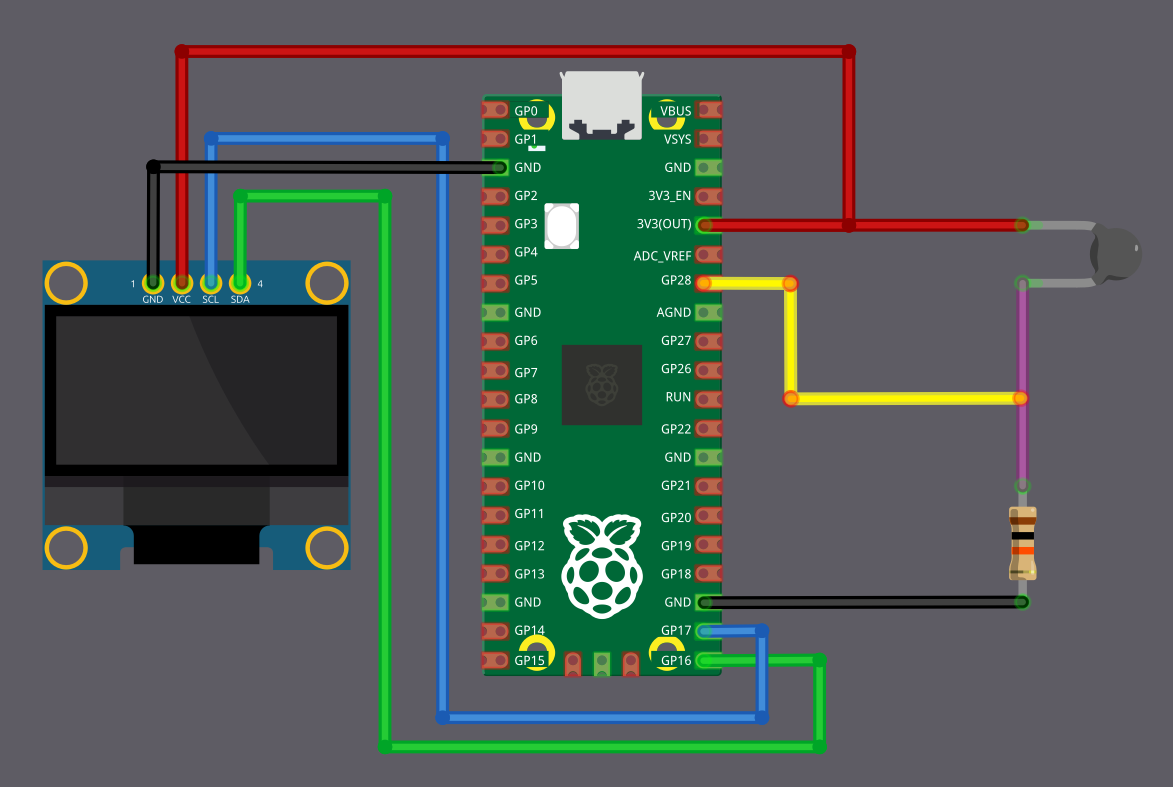
Thermistor Connection
We are going to connect the thermistor as a voltage divider and feed the divider output into an ADC pin on the Pico. Here, the thermistor acts as R1 and is connected to the 3.3 V supply, which means the ADC value decreases as the temperature increases (NTC behavior).
| Pico Pin | Wire | Component |
|---|---|---|
| 3.3 V |
|
One end of the thermistor |
| GPIO 28 (ADC2) |
|
Junction between thermistor and 10 kΩ resistor |
| 10 kΩ resistor |
|
Other end of the thermistor |
| GND |
|
Other end of the 10 kΩ resistor |
OLED (I2C) Connection
The OLED display is connected using I2C. SDA is connected to GPIO 16 and SCL is connected to GPIO 17.
| Pico Pin | Wire | OLED Pin |
|---|---|---|
| GND |
|
GND |
| 3.3 V |
|
VCC |
| GPIO 16 |
|
SDA |
| GPIO 17 |
|
SCL |