SD Card (SDC/MMC)
Sooner or later, you may want to store data that does not fit in flash memory. This could be sensor logs, configuration files, game assets, or anything else that needs to survive a power cycle. One of the most practical ways to do this is by using an SD card. In this section, we are going to learn how to use an SD card module with the Raspberry Pi Pico.
MMC (MultiMediaCard)
The MultiMediaCard (MMC) was introduced as an early type of flash memory storage, preceding the SD Card. It was commonly used in devices such as camcorders, digital cameras, and portable music players.
Like modern flash storage, MMC stores data as electrical charge in flash memory cells. This is very different from optical media such as CDs or DVDs, which store data as physical marks read by a laser.
Although MMC cards themselves are mostly obsolete today, they are still relevant because SD cards inherited many ideas from MMC.
SD (Secure Digital) Card
The Secure Digital Card, usually called an SD card, built on the ideas of MMC and expanded them. SD cards became extremely popular and are now used in cameras, embedded systems, and single board computers. There is a smaller variant called the microSD card that is typically used in microcontroller projects.
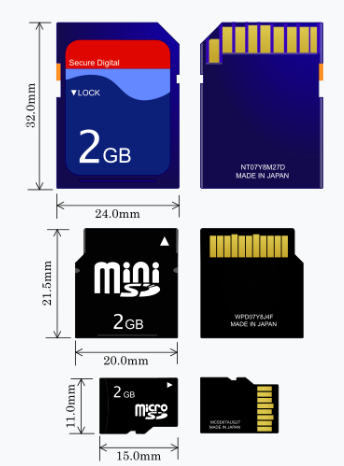
Image credit: Based on SD card by Tkgd2007, licensed under the GFDL and CC BY-SA 3.0, 2.5, 2.0, 1.0.

Internally, SD cards read and write data in fixed size blocks, typically 512 bytes; Because of this, data is accessed in blocks rather than as individual bytes. Filesystems such as FAT sit on top of these blocks and manage how files are stored and retrieved.
Hardware Requirements
We’ll be using the Micro SD Card adapter module. You can search for either “Micro SD Card Reader Module” or “Micro SD Card Adapter” to find them.
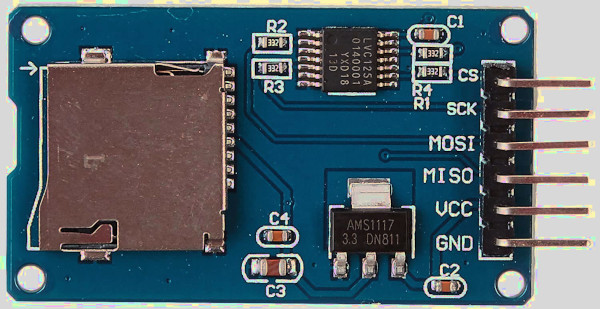
And of course, you’ll need a microSD card. The SD card should be formatted with FAT32; Depending on your computer, you may need a separate SD or USB adapter to format the card, since not all laptops have a microSD slot.
References:
- I highly recommend watching Jonathan Pallant’s talk at Euro Rust 2024 on writing an SD card driver in Rust. He wrote the driver we are going to use (originally he created it to run MS-DOS on ARM). It is not intended for production systems.
- If you want to understand how it works under the hood in SPI mode, you can refer to this article: How to Use MMC/SDC