Multi-Cell Custom Glyph
In this section, we create Ferris using six adjacent grids with the generator from the previous page. Below is the Rust code that uses the generated byte arrays to render the glyph on the LCD.
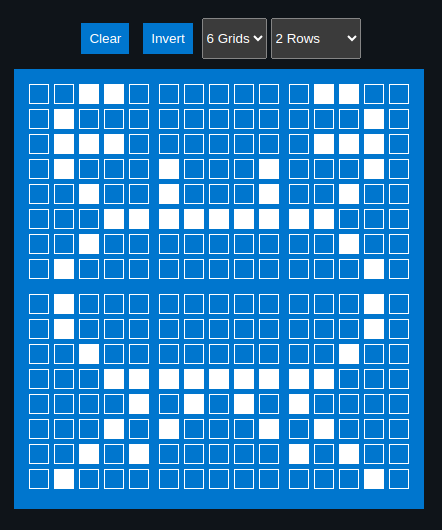
We will focus only on the glyph composition here. Project setup and LCD initialization remain the same as before and are not repeated in this section.
Generated Byte array for the characters
#![allow(unused)]
fn main() {
const SYMBOL1: [u8; 8] = [
    0b00110, 0b01000, 0b01110, 0b01000, 0b00100, 0b00011, 0b00100, 0b01000,
];

const SYMBOL2: [u8; 8] = [
    0b00000, 0b00000, 0b00000, 0b10001, 0b10001, 0b11111, 0b00000, 0b00000,
];

const SYMBOL3: [u8; 8] = [
    0b01100, 0b00010, 0b01110, 0b00010, 0b00100, 0b11000, 0b00100, 0b00010,
];

const SYMBOL4: [u8; 8] = [
    0b01000, 0b01000, 0b00100, 0b00011, 0b00001, 0b00010, 0b00101, 0b01000,
];

const SYMBOL5: [u8; 8] = [
    0b00000, 0b00000, 0b00000, 0b11111, 0b01010, 0b10001, 0b00000, 0b00000,
];

const SYMBOL6: [u8; 8] = [
    0b00010, 0b00010, 0b00100, 0b11000, 0b10000, 0b01000, 0b10100, 0b00010,
];
}
Declare them as character
Each glyph is stored in a separate CGRAM slot. We use slots 0 through 5 for this example.
#![allow(unused)]
fn main() {
lcd.custom_char(&mut Delay, &SYMBOL1, 0);
lcd.custom_char(&mut Delay, &SYMBOL2, 1);
lcd.custom_char(&mut Delay, &SYMBOL3, 2);
lcd.custom_char(&mut Delay, &SYMBOL4, 3);
lcd.custom_char(&mut Delay, &SYMBOL5, 4);
lcd.custom_char(&mut Delay, &SYMBOL6, 5);
}
Display
We write the first three glyphs on the first row, followed by the remaining three glyphs on the second row, aligning them to form a single composite symbol.
#![allow(unused)]
fn main() {
lcd.set_cursor(&mut Delay, 0, 4)
    .write(&mut Delay, CustomChar(0))
    .write(&mut Delay, CustomChar(1))
    .write(&mut Delay, CustomChar(2));

lcd.set_cursor(&mut Delay, 1, 4)
    .write(&mut Delay, CustomChar(3))
    .write(&mut Delay, CustomChar(4))
    .write(&mut Delay, CustomChar(5));
}
Clone the existing project
You can clone (or refer) project I created and navigate to the mutli-glyph folder.
git clone https://github.com/ImplFerris/rp2040-projects
cd rp2040-projects/embassy/lcd/mutli-glyph/